ScanQ, MailQ, RecordsQ, PrintQ and CostQ run on-premise or in a virtual private cloud on your own Windows servers. The Zebraworks Bridge connects them to the Zebraworks platform in Azure, moving documents securely between your firewall and the platform.
The requirements below are grouped by what you are deploying. Each section names the products it applies to. For BillQ, PayQ and DataQ AI, see the Revenue Acceleration system requirements.
SOC 2 certification
Zebraworks is SOC 2 Type II certified, demonstrating our commitment to the highest standards of data security, availability, and confidentiality.
Read the SOC 2 security overview
On-premise and virtual private cloud applications
Applies to: ScanQ, MailQ, RecordsQ, PrintQ, CostQ
These applications can run on-premise or in a virtual private cloud, optionally working with the Zebraworks Outlook Add-in and Mobile App via the Zebraworks Bridge to the cloud.
Identity provider
- On-premises Active Directory
- Hybrid Azure Active Directory
- Azure Active Directory Domain Services (AD DS) within an Azure Virtual Network
Security
We recommend using https with a trusted SSL certificate; http is optional.
Database server
- Microsoft SQL Server 2025, 2022, 2019, 2017 or 2016
- Workgroup, Standard or Enterprise editions
- SQL Express may be used in small installations, including on the ScanQ Command Center server. Discuss the additional resources required with your implementation consultant.
Application servers
Applies to: ScanQ, MailQ, RecordsQ, PrintQ, CostQ
Your implementation consultant will make specific recommendations based on your expected usage and environment. All application servers run Windows Server 2025, 2022, 2019 or 2016.
Baseline server classes
Utility application server
For backend application services.
- 2 CPU cores (2.6GHz or faster), 4GB RAM
- C: drive for Windows, D: drive of 100GB or more for the application
- 1GB connectivity
Single application server
One Zebraworks application per server.
- 4 or more CPU cores (2.6GHz or faster), 6GB or more RAM
- C: drive for Windows, D: drive of 100GB or more for the application
- 1GB connectivity
Multi-application server
Multiple Zebraworks applications per server. When CostQ and ScanQ are implemented together, Enterprise Platform and Command Center are typically installed on the same server.
- 8 or more CPU cores (2.6GHz or faster), 16GB or more RAM
- C: drive for Windows, D: drive of 150GB or more for the applications
- 1GB connectivity
High volume application server
Used for scanning and OCR.
- 8 or more CPU cores (2.6GHz or faster), 24GB or more RAM
- C: drive for Windows, D: drive of 300GB or more for the applications
- 1GB connectivity
Requirements by application
- ScanQ Command Center, without CostQ — single application server
- ScanQ Command Center, with CostQ — multi-application server
- ScanQ InfoRoute — high volume application server, with 2 cores in addition to the 4 to 6 required by ABBYY. The service, orchestrator, import agent and engines can all run on one server.
- ScanQ InfoRoute engines — high volume application server, with 1 core in addition to the 4 to 6 required by ABBYY. Additional engine-only servers can be deployed to reduce scanning and OCR time.
- IIS — single application server
- PrintQ — utility application server
- CostQ — single application server
- CostQ replication — single application server
- Multiple applications on one server — multi-application server. Depending on usage and environment, Zebraworks applications can be combined on single server instances. Customize with your implementation consultant.
ABBYY is licensed to use 4 cores by default, and can be increased to 6 cores per server with additional licensing.
Zebraworks Bridge
The Zebraworks Bridge securely connects the Zebraworks platform running in Azure to systems inside your firewall or virtual private cloud.
Security, all Bridge deployments
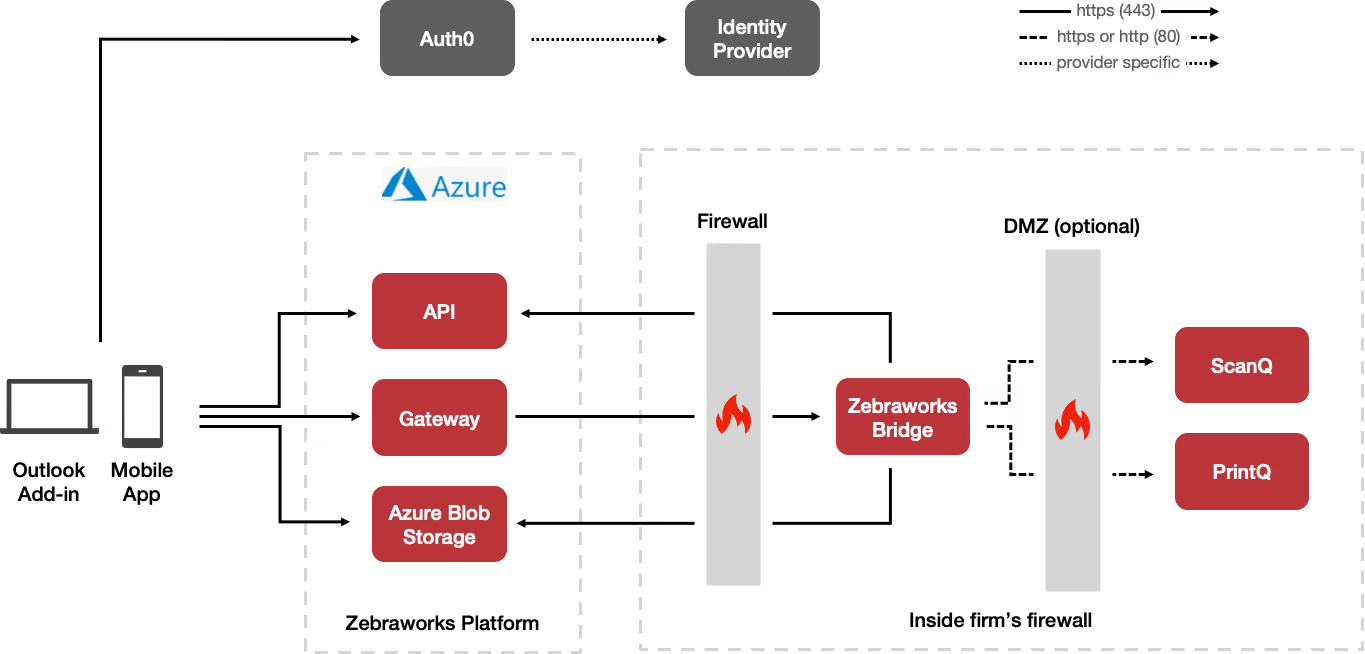
All incoming traffic is validated using Auth0 and only valid https connections are accepted. The firm's firewall will need to be configured to accept incoming connections only from the Zebraworks platform egress IP.
- SSL TLS 1.2 or greater with a trusted certificate on a public domain is required
- All information in transit is encrypted over TLS
- The Zebraworks Bridge Admin UI is only accessible to the localhost
Bridge for scanning, print and mail
Applies to: ScanQ, PrintQ
For the Mobile App, the Bridge securely moves documents via the Gateway and Azure Blob Storage to ScanQ and PrintQ, and relays print requests via the Gateway to PrintQ. For the Outlook Add-in, the Bridge delivers documents via the Gateway, caching from the original document repository inside the firm's firewall; blob storage is not used.
Bridge server
- Utility application server
- .NET 6 runtime
- Trusted access to the Zebraworks IP address
- Network communication access to ScanQ Command Center
Document handling
- Documents are only stored in the firm's repository within the firm's firewall
- During transfer, documents are encrypted with runtime generated cycled keys, and files are promptly and permanently deleted after transfer
- Documents are removed from local storage
Mobile app and Outlook add-in
Applies to: ScanQ, PrintQ
The Zebraworks Outlook Add-in shows a user's ScanQ inside Outlook, including Outlook web and Outlook mobile. The Zebraworks Mobile Application enables scanning to your ScanQ, and printing and secure release with PrintQ.
Operating system versions
- iOS and iPadOS 14.4 or later
- Android 12 or later
Identity provider
Sign-on is via your existing access control system, using Auth0 to authenticate with your identity provider of choice, including Active Directory, Azure AD, ADFS, LDAP, SAML and others.
Privacy
Refer to the mobile app privacy policy for detailed information on how the app handles data.
Port usage
Applies to: ScanQ, MailQ, RecordsQ, PrintQ, CostQ
The ports below apply to on-premise and virtual private cloud deployments.
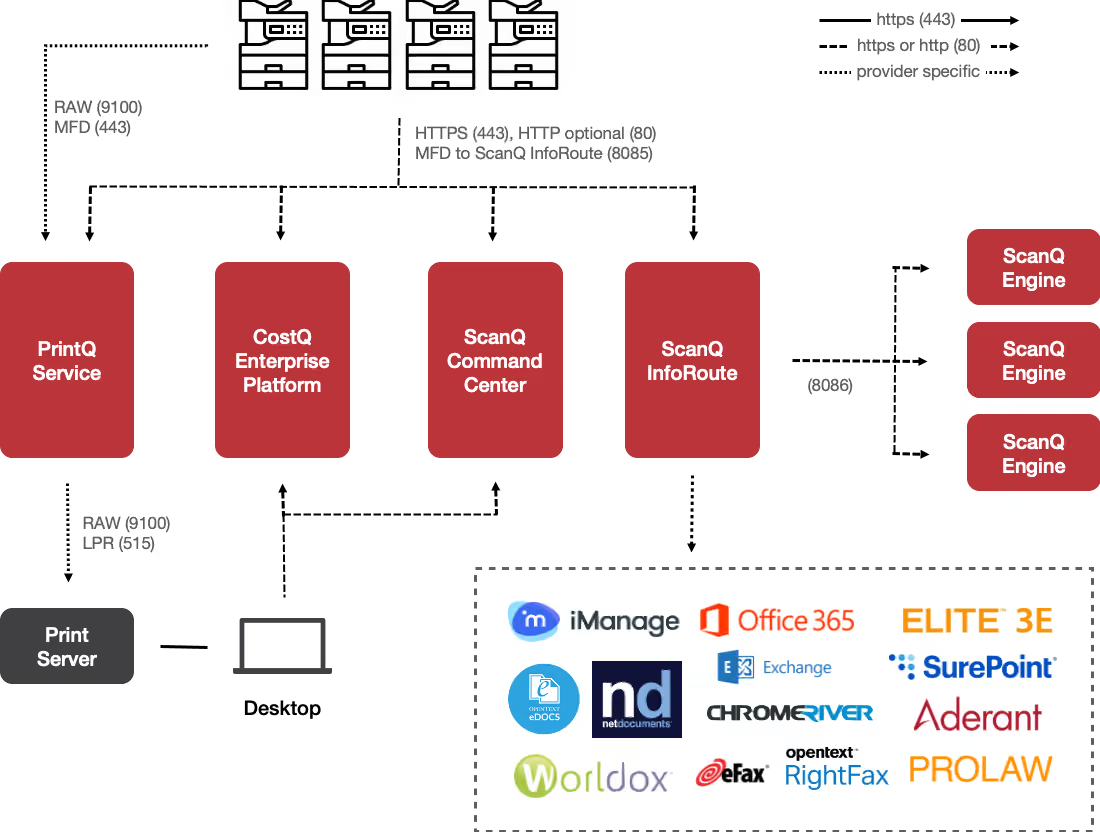
Scanning, capture and routing
- Engine to Orchestrator — 8086, https recommended, http optional
- Service via SMBv2 to watch folders — 445
- Orchestrator, Engine, Agent and Command Center Service to Command Center — 443 https recommended, or 80 http optional
- Embedded or Tablet to InfoRoute — 8085, https recommended, http optional
- Embedded or Tablet to Data Services — 81, https recommended, http optional
- Embedded or Tablet to Command Center — 443 https recommended, or 80 http optional
Browser and administrative access
- Browser to Command Center — 443 https recommended, or 80 http optional
- Browser to Enterprise Platform — 443 https recommended, or 8080 http optional
- Browser to Embedded Web — 4443 https recommended, or 83 http optional
- Browser to Konica remote panel — 50443
Embedded device integration
- Embedded Web to Data Services — 81
- Embedded Web to Command Center — 443
- Embedded Web to Konica — 50003 and 50002
- Konica or Xerox to FTP on Embedded Web — 21
- FTP on Embedded Web to Konica or Xerox — 20
Print management
- Print Manager to Data Services — 81, https or http
- Desktops to Print Agent — 9100
- Embedded or Tablet to Print Agent — 82
- Mobile Print to Command Center — 443
- Print Agent UPD listening — 161
Database and web server
- Orchestrator, Engine, Agent, InfoRoute and Command Center to SQL — 1433
- IIS to SQL — 1433
- IIS to Command Center — 443
Architecture
Core architecture
On-premise and virtual private cloud deployment for ScanQ, MailQ, RecordsQ, PrintQ and CostQ.
Bridge for scanning, print and mail
How the Bridge moves documents between the Mobile App, the Outlook Add-in and your repository.

.svg)